GuitarStudio2.0.3
Publisher Description
"This is mind blowing. You can make music on this instrument quickly and easily. It is way beyond the other guitar apps for its ability to let you focus on music making without feeling like you are going against the technology! If you are a musician you will be smilling in moments after you load this in to your phone." - Jordan Rudess
"This is the App (especially since I own it's Electric Partner also) that in my mind 'broke the sound barrier'. It outdistanced anything I had ever seen and would NEVER have believed possible back in the day. I have owned this since it came on the market and it still blows my mind." - Mister_App_Guru
"All around an ingenious way to play on the iPhone even if You Don't Play the guitar. I'm certain this WILL inspire more people to pick up the real thing." - T.Branton,
"OUTA SIGHT!!! I have the other guitar apps... This is a REAL instrument!" - 3radart,
"The first truly *musical* app for the iPhone ... While other virtual instruments are severely limited by the iphone's dimensions, this one caters to its strengths. Oh Joy!" - Wintancian,
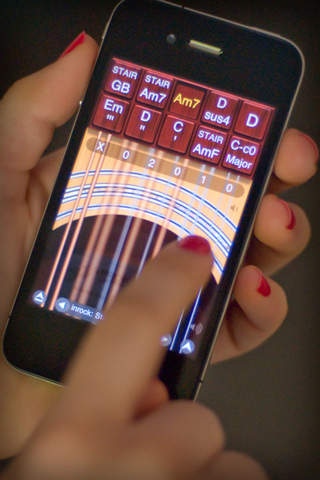
Learn and play your favorite songs with Guitar, the amazing acoustic guitar app for your iPhone or iPod touch. More than just a virtual fretboard, Guitar is an instrument optimized for performance. You can perform songs with any combination of chords and melodies on Guitar's highly playable and easy-to-use interface.
SOUND
6 great acoustic guitar sounds, including 6 & 12-string Steel and Nylon
Notes never "drop out" due to limited sample length
Adjust tuning to match recordings, other instruments
Reverb effect simulates room ambience
CHORDS
Easily create and save your own custom chords
Strumming position controls loudness of chords
Chords are easily reordered for fast access
SCALES
21 scales, available in 12 keys, let you play melodies
"Advanced moves": hammer-on's, pull-off's, and slides
User-selectable string labels
PERFORMANCE
Slide finger between buttons for fast chord transitions
Shortcuts for fast song editing and button reordering
Support for the left-handed guitarist
RECORDING
Record performances with optional metronome
Play along with recordings, even use different sound
Speed up or slow down performance after recording
SONGS & PLAYLISTS
Combinations of chords & scales can be saved as songs
Backup/restore songs to the web
Songs can now have multiple pages of buttons
SHARING
Built in support for SoundCloud
Export your recordings to you computer via iTunes
Supports Audio Copy/Paste between other apps
AIRPLAY
A jukebox of shared songs from around the world
Share your performances and be rated by other guitarists
Download songs and performances from other users
Check out the AirPlay charts: http://fdgm.us/AirPlayG
PLAY WITH MUSIC
Built in music player
Play along with iPod library or imported tracks
STAY UP TO DATE
facebook.com/FDGMusic
twitter.com/FDGMusic
youtube.com/FDGMusic
soundcloud.com/FDGMusic
Requires iOS 4.3 or later. Compatible with iPhone, iPad, and iPod touch.
About GuitarStudio
The company that develops GuitarStudio is Frontier Design Group, LLC. The latest version released by its developer is 2.0.3.
To install GuitarStudio on your iOS device, just click the green Continue To App button above to start the installation process. The app is listed on our website since 2008-09-27 and was downloaded 15 times. We have already checked if the download link is safe, however for your own protection we recommend that you scan the downloaded app with your antivirus. Your antivirus may detect the GuitarStudio as malware if the download link is broken.
How to install GuitarStudio on your iOS device:
- Click on the Continue To App button on our website. This will redirect you to the App Store.
- Once the GuitarStudio is shown in the iTunes listing of your iOS device, you can start its download and installation. Tap on the GET button to the right of the app to start downloading it.
- If you are not logged-in the iOS appstore app, you'll be prompted for your your Apple ID and/or password.
- After GuitarStudio is downloaded, you'll see an INSTALL button to the right. Tap on it to start the actual installation of the iOS app.
- Once installation is finished you can tap on the OPEN button to start it. Its icon will also be added to your device home screen.
